Turn a toy into a brick model
A toy holds still, which makes it the easiest thing to turn into bricks. Scan it with your phone, see it rebuilt in bricks with the exact brick count, and print it when you like it. Preview and brick count are free.

How it works
- Scan it with your phone: Open Brickalike on your phone and tap Scan it with your camera. Put the toy on a plain surface, take one empty shot of the background, then turn the toy slowly for about 30 seconds. It all runs in the browser and the photos stay on your phone.
- Pick the detail and look at it: Slide the detail from 8 to 72 studs wide, switch between bricks and thinner plates, and pick all 22 colours or easy-to-buy ones. The 3D preview, brick count and parts list on screen are free.
- Print it or build it: With Pro, save a one-piece STL to print as a model, an STL of the separate bricks, a parts list, a shopping list and a building manual.
Tips for a better result
- A contrasting, plain background gives the cleanest shape.
- Put a shiny toy in even light. Glare confuses a camera scan.
- For a toy about the size of a duck, 22 to 28 studs wide is a good start.
- Bricks turn a smooth toy into steps. A bigger stud count smooths the curves.
Questions
How many bricks will my toy need?
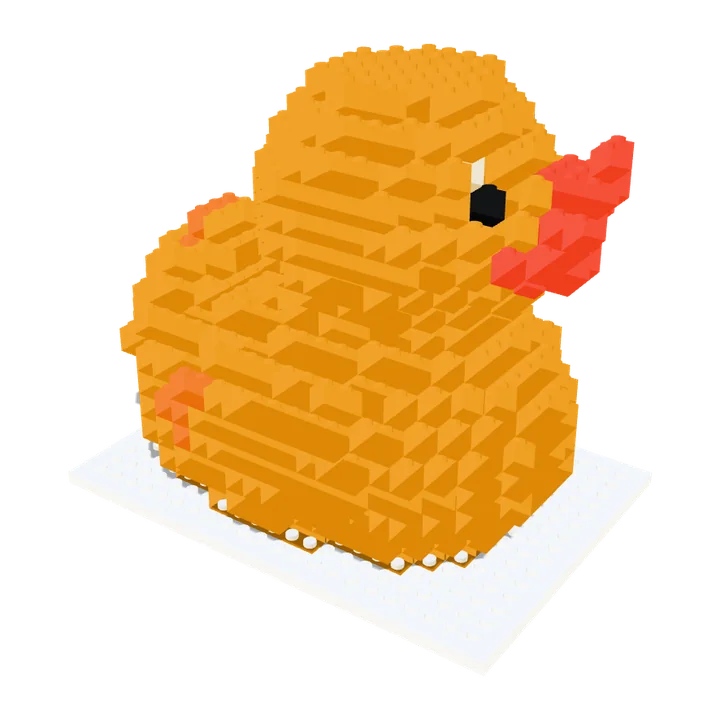
The preview shows the exact count as you change the detail. The rubber duck in our example comes out at 392 bricks at 22 studs wide.
Do I have to print it?
No. The parts list and shopping list let you buy the bricks instead.
Try it free, save the files with ProMake your next one
Scanning, the 3D preview, the brick count and the parts list on screen are free. Saving the files (one-piece STL, brick kit, parts lists and building manual) is part of Brickalike Pro, a one-off €11.99 with secure checkout by Stripe. One Pro code works on up to 3 browsers at a time.
Pro Pro is active on this browser: every download is unlocked.
Build one free