Guide
Custom brick building instructions and parts list
Get custom brick building instructions for your own object. Brickalike works out which standard bricks you need, writes a parts list and a BrickLink wanted list, and makes a printable step-by-step manual. No 3D printer needed.
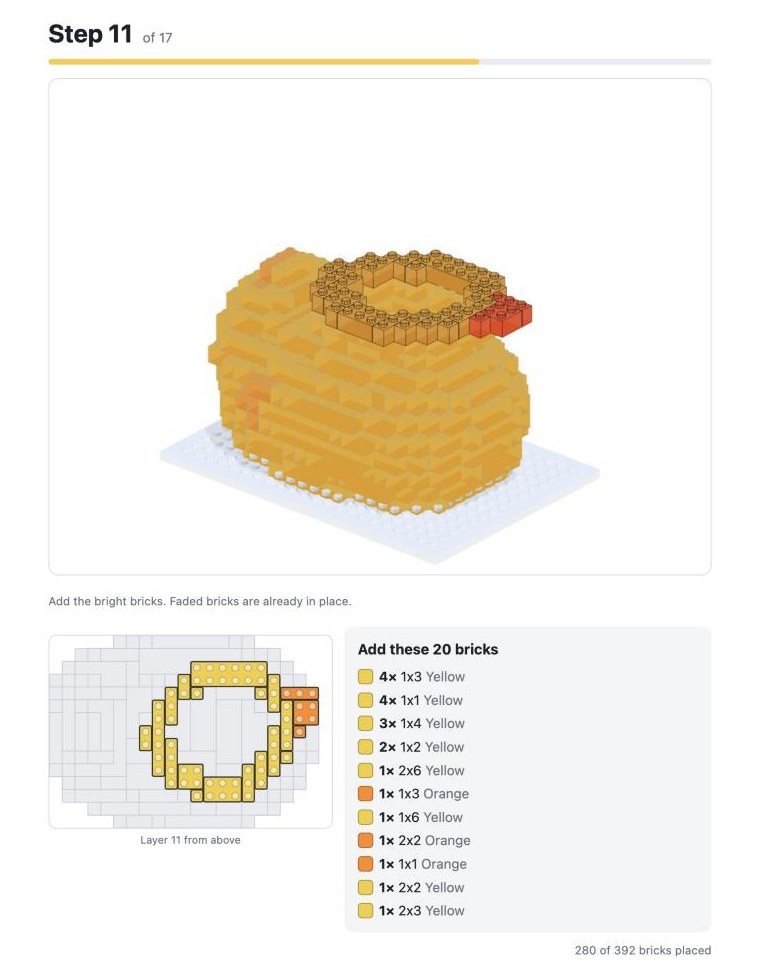
What is in the build instructions (PDF)
- A cover with a 3D picture of the finished model and the facts: bricks, steps, different parts and studs across.
- A parts list to tick off as you gather the bricks.
- One page per layer: a 3D picture of the model so far (new bricks bright, earlier ones faded), a plan of that layer seen from above, and the exact bricks to add.
It opens as a printable page; choose Save as PDF in the print window to keep it as a file. There is also a step-by-step view on screen, layer by layer.
Parts list and BrickLink wanted list: buying the bricks
You get the parts list as a CSV and as a BrickLink wanted list (XML) you can upload to BrickLink. The site shows a rough cost estimate for used parts, without postage. To make buying easier:
- Choose Easy to buy colours instead of all 22.
- Keep Hollow inside on: it drops the bricks nobody can see.
- Lower the detail: fewer studs wide means far fewer bricks.
Preview it free, pay once to download
Scanning, the 3D preview, the brick count and the parts list on screen are free. Saving the files (one-piece STL, brick kit, parts lists and building manual) is a one-off €12, with secure checkout by Stripe. One unlock code works on up to 3 browsers or devices.
Build one free