Free STL splitter
Model too big for your printer? Choose the STL, pick your bed size and get pieces that fit, each one closed and solid.
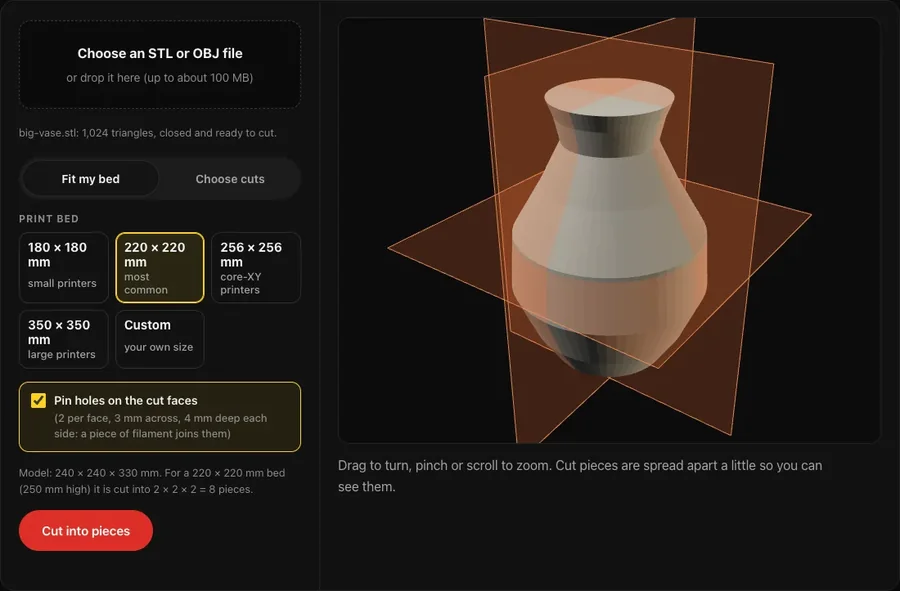
Your model shows here, with the cuts as see-through planes.
Drag to turn, pinch or scroll to zoom. Cut pieces are spread apart a little so you can see them.
| Piece | Size (mm) | Fits | Closed |
|---|
How it works
- Choose your file.STL or OBJ, in mm. It is tidied first, the same way as the free STL repair, so small holes do not spoil the cut.
- Pick your bedand the model is cut into a grid of equal pieces that each fit. Or choose your own cuts across X, Y or Z.
- Every cut face is filled flat,so each piece is a closed solid your slicer is happy with. Pin holes are added only where there is enough plastic round them.
- Downloada ZIP with one STL per piece (they line up again if you open them together), or one 3MF with every piece as its own object, laid out flat.
Cut faces print best flat on the bed. Turn each piece in your slicer so a cut face sits on the bed where you can.
Questions
Is my file uploaded anywhere?
No. The cutting runs in your browser on your own device. The file never leaves it.
Will the pieces be solid, or open where they were cut?
Solid. Every cut face is filled flat, so each piece is closed and watertight: every edge is shared by exactly two triangles. The piece list checks each one.
How do I join the pieces after printing?
Tick pin holes and each cut face gets two holes, 3 mm across and 4 mm deep on each side. Push a short piece of filament into one hole as a pin, line the pieces up and glue them. Super glue works for PLA.